Play immediately
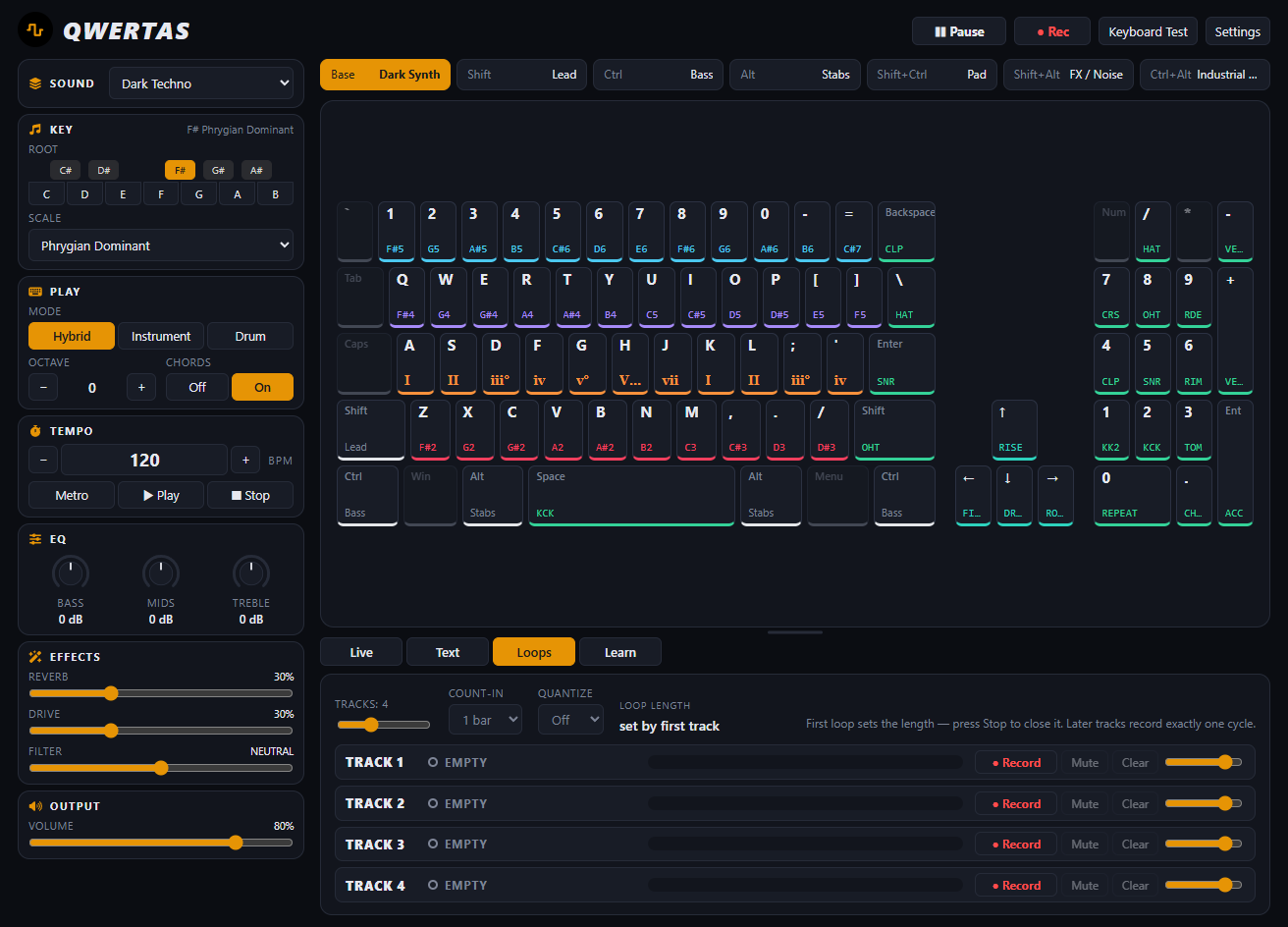
Rest both hands on the keyboard. Melodic rows, drums, and modifiers are visible on screen.
Software-defined instrument
Turn an ordinary computer keyboard into an expressive digital instrument—built around engineered synthetic sound, immediate playability, and layered looping.
Not a DAW. Not another preset collection. An instrument.
01 / The instrument
QWERTAS treats the computer keyboard as a musical surface in its own right. Physical key positions become notes, chords, drums, and layers—without pretending to be a tiny piano.
Rest both hands on the keyboard. Melodic rows, drums, and modifiers are visible on screen.
Choose a profile, key, scale, mode, EQ, effects, and output without leaving the instrument.
Record the final output or preserve musical events for typed playback and loop performance.
02 / Sound
QWERTAS uses Web Audio synthesis instead of a sample library. Its focused voice families are built for clarity, motion, impact, and playability.
Audio previews will arrive with a public release.
Clean, articulate waveforms for leads, subs, and soft keys.
Ratio-driven harmonic voices for glass, bells, and metallic motion.
Evolving digital timbres with controlled harmonic movement.
Synthesized kicks, snares, hats, and impacts—no sample pack required.
03 / Play
DVORAQWERTAS makes the home row the primary register, with adjacent rows continuing the chromatic range. QWERTORAS offers an optional ergonomic alternative.
Default · linear chromatic progression
Explanatory mapping view. The desktop app remains the playable instrument.
04 / Loops
The first pass sets the cycle. Add another part on the next boundary, adjust each track, and keep playing live over the result.
05 / Workflow
QWERTAS plays through standard computer audio. Where the runtime and operating system allow it, output-device selection makes it easier to include the instrument in a broader routing or hardware workflow.
It is a desktop instrument—not a VST/AU plugin, DAW, or virtual audio cable.
Development status
QWERTAS is in active development. Native export targets are configured for all three desktop operating-system families, but no public, signed release or download is published here yet.
06 / FAQ
No. The point is to play the computer keyboard already in front of you.
No. It is a focused desktop instrument with typed scores, learning tools, loops, and recording.
Between two and eight active tracks, with four by default. Lowering the count retains hidden track events for the current session.
High is the lower-cost default. Ultra applies higher-quality processing where it matters and uses more CPU; it does not simply make the instrument louder.
Exports are configured for Windows x64, macOS Intel and Apple silicon, and Linux x64. Each release must be built and validated on its matching operating system; public signed downloads have not been published.